
Octo + GitHub Actions
Run your CI workflows on your own hardware.
Trigger, monitor, and manage Octo jobs directly from GitHub.
Why Use Octo with GitHub Actions?
Octo transforms your own infrastructure into a powerful CI/CD execution layer, eliminating expensive cloud runner costs while maximizing your hardware investment.
Efficient Infrastructure Utilization
Instead of paying per-minute for cloud runners, leverage your existing servers and hardware. Octo lets you run CI/CD jobs directly on your infrastructure, ensuring 100% utilization of your compute resources.
Eliminate Cloud Runner Costs
GitHub Actions cloud runners are expensive and limited. With Octo, you eliminate per-minute billing and runner queuing. Your infrastructure becomes your CI/CD powerhouse — fully under your control.
Unlimited Parallelism
Scale your CI/CD pipelines without hitting runner limits or paying premium rates. Run hundreds of parallel jobs across your infrastructure — limited only by your hardware.
Overview — Integrating Octo into GitHub Workflows
Octo seamlessly integrates with GitHub Actions, allowing you to run your CI/CD workflows on your own hardware. You can add more runners if you need additional parallelism or want to distribute workloads across different environments. It's also possible to set up Octo in a cluster configuration to scale out execution even further.
Without Octo: Sequential Execution
By default, GitHub Actions executes jobs sequentially, one after another. While this is simple and reliable, it takes significantly longer. In this example, software build takes nearly 4 minutes and testing around 17 minutes — all running back-to-back with no parallelism.

Sequential: Build → Test → Done (~21 minutes total)
With Octo: Parallel Execution
Octo dispatches jobs to external nodes and runs them in parallel, dramatically reducing total execution time. The GitHub runner remains stable and can process additional jobs without interruption. The same pipeline completes in a fraction of the time with full resource utilization.
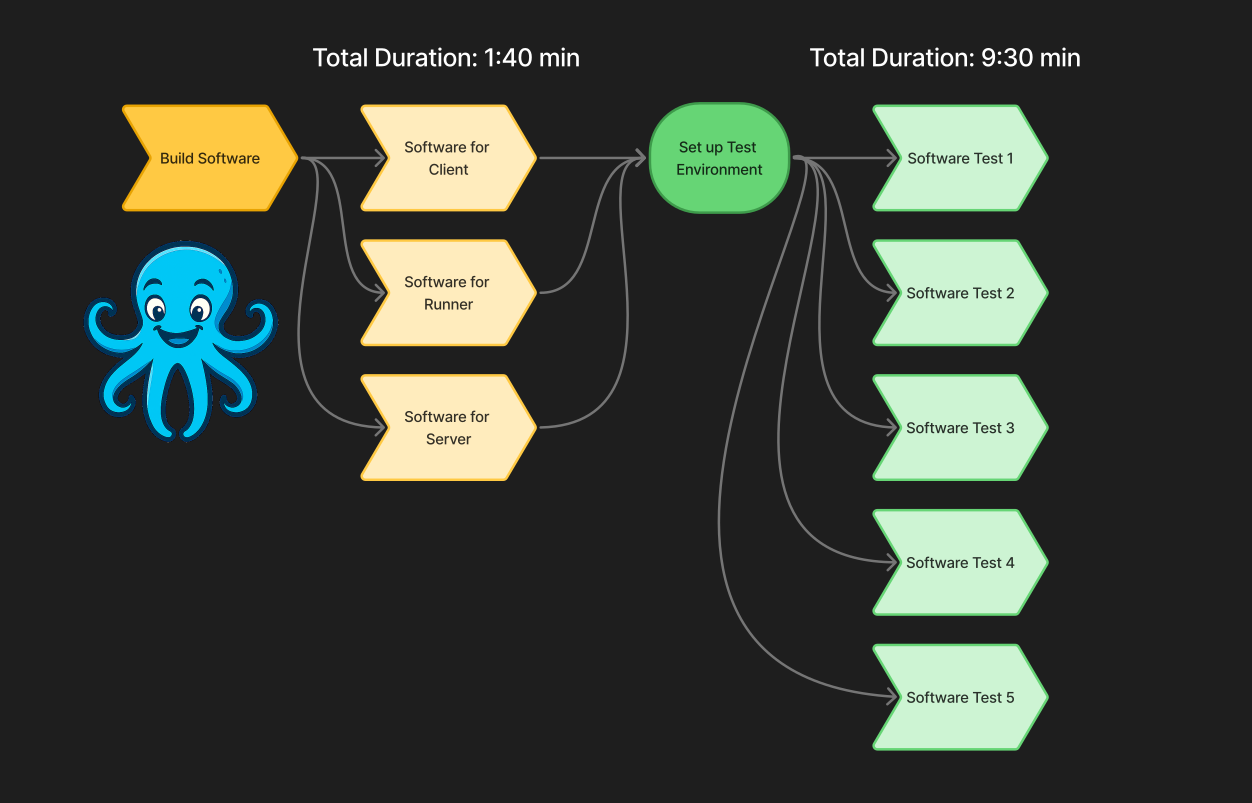
Parallel: Build + Test simultaneously (Significantly faster)
With Octo: Cluster Setup
For even greater scalability, Octo supports cluster configurations across multiple machines. Distribute workloads across your entire infrastructure and achieve unlimited parallelism with complete fault tolerance and load balancing.
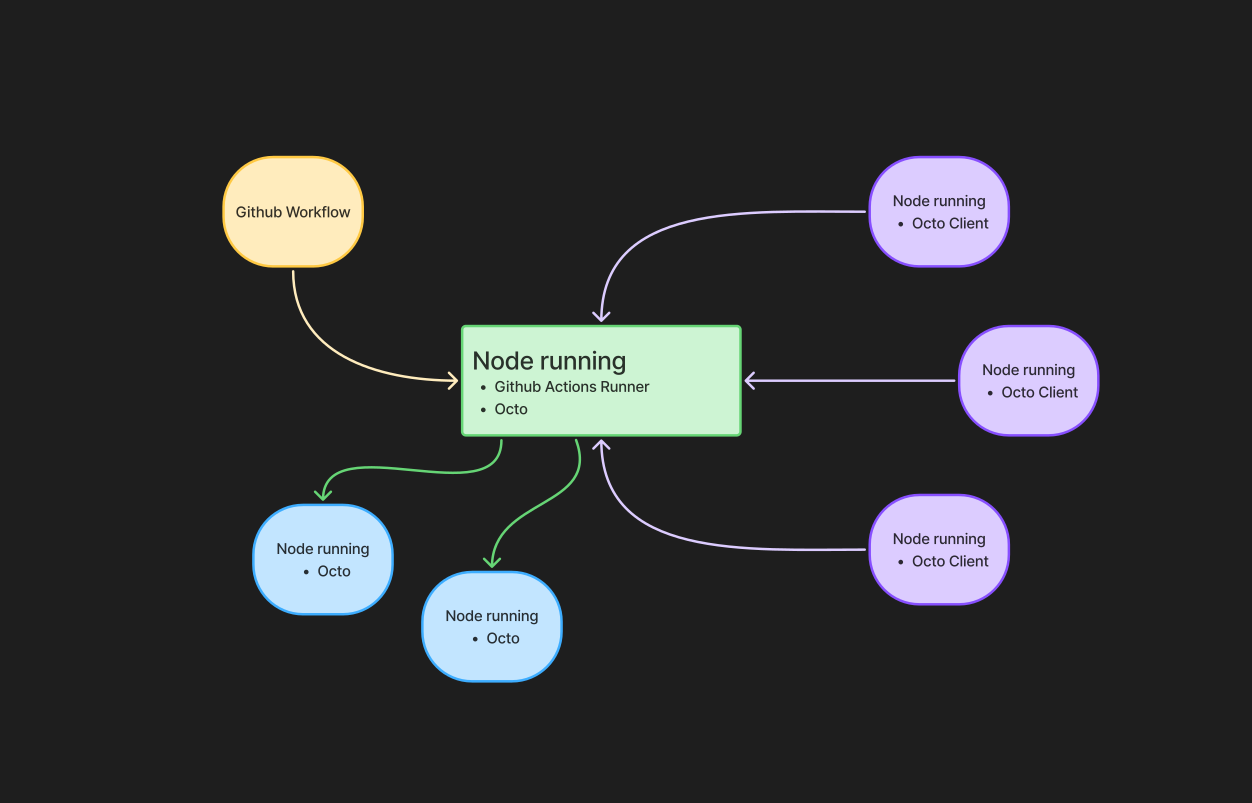
Cluster: Unlimited parallel jobs
Example GitHub Actions Workflow
Below is the shown workflow of how Octo can enable parallel execution within a single CI job.
# ============================================================
# LINUX BUILD (Octo parallel)
# ============================================================
build-linux:
if: ${{ github.event.inputs.platform == 'all' || github.event.inputs.platform == 'linux' }}
name: Build Linux Installers
runs-on: [self-hosted, windows, x64, octo]
env:
LOCAL_DEB_CACHE: C:\octo\artefacts\${{ github.run_id }}\linux
steps:
- uses: actions/checkout@v4
- name: Octo login
shell: powershell
run: |
octo login --token $env:OCTO_TOKEN --server $env:OCTO_SERVER
octo config --docker python:3.11
- name: Build Linux packages in parallel
shell: powershell
run: |
$root = Get-Location
$jobs = @()
foreach ($c in @("client","server","runner")) {
$jobs += Start-Process powershell `
-ArgumentList "-Command cd `"$root/$c`"; octo run ./start_build.sh" `
-PassThru
}
$jobs | Wait-Process
- name: Collect .deb files into docker_debs/
shell: powershell
run: |
Write-Host "Collecting .deb files..."
if (Test-Path docker_debs) {
Remove-Item docker_debs -Recurse -Force
}
New-Item -ItemType Directory -Force -Path docker_debs | Out-Null
$debFiles = Get-ChildItem -Recurse -Filter *.deb |
Where-Object { $_.FullName -notmatch '\\docker_debs\\' }
if (-not $debFiles) {
Write-Error "No .deb files found!"
exit 1
}
foreach ($file in $debFiles) {
Copy-Item $file.FullName docker_debs -Force
}
Get-ChildItem docker_debs
# ============================================================
# Test Set (PARALLEL, OCTO ORCHESTRATED)
# ============================================================
testset:
name: Run Octo Test Set (parallel)
runs-on: [self-hosted, windows, x64, octo]
needs:
- wsl-infra-up
- build-docker
if: ${{ github.event.inputs.platform == 'all' || github.event.inputs.platform == 'linux' }}
steps:
- uses: actions/checkout@v4
- name: Configure Octo
shell: powershell
run: |
octo login --token $env:OCTO_TOKEN --server $env:OCTO_SERVER
octo config --docker octo-test-base
- name: Run tests in parallel via Octo
shell: powershell
run: |
# Funktion zum Parsen von JUnit XML
function Get-TestCasesFromJUnit {
param([string]$xmlPath)
if (-not (Test-Path $xmlPath)) {
return @()
}
try {
[xml]$xml = Get-Content $xmlPath -Raw -Encoding UTF8
$cases = @()
foreach ($testcase in $xml.testsuites.testsuite.testcase) {
$cases += [PSCustomObject]@{
name = $testcase.name
time = $testcase.time
failure = $testcase.failure
skipped = $testcase.skipped
}
}
return $cases
}
catch {
Write-Warning "Could not parse JUnit XML: $xmlPath"
return @()
}
}
# Hauptlogik
$root = Get-Location
$tests = @(
"smoketest.py",
"test_daily.py",
"test_file_upload.py",
"test_docker.py",
"test_install_feat.py"
)
$jobs = @()
$exitCodeFiles = @()
New-Item -ItemType Directory -Force test-reports | Out-Null
foreach ($test in $tests) {
$exitFile = "$env:TEMP\exit-$test.txt"
$exitCodeFiles += $exitFile
$script = @"
cd '$root/test'
octo run $test
`$LASTEXITCODE | Out-File '$exitFile' -NoNewline
exit `$LASTEXITCODE
"@
$jobs += Start-Process powershell `
-ArgumentList "-Command", $script `
-NoNewWindow `
-PassThru
}
$jobs | Wait-Process
# GitHub Job Summary
$summary = "## Octo Test Summary`n`n"
$summary += "| Testfile | Status |`n"
$summary += "|----------|--------|`n"
for ($i = 0; $i -lt $tests.Count; $i++) {
$test = $tests[$i]
$code = [int](Get-Content $exitCodeFiles[$i] -Raw)
$name = [System.IO.Path]::GetFileNameWithoutExtension($test)
$xmlPath = "test-reports/junit-$name.xml"
if ($code -eq 0) {
$summary += "| $test | :white_check_mark: PASS |`n"
} else {
$summary += "| $test | :x: FAIL |`n"
}
# Einzelne Testfälle (Details)
$cases = Get-TestCasesFromJUnit $xmlPath
if ($cases.Count -gt 0) {
$summary += "`n`n"
$summary += "Testcase Overview
`n`n"
$summary += "| Testcase | Status | Duration (s) |`n"
$summary += "|----------|--------|--------------|`n"
foreach ($case in $cases) {
$status = ":white_check_mark: PASS"
if ($case.failure) { $status = ":x: FAIL" }
elseif ($case.skipped) { $status = ":fast_forward: SKIP" }
$summary += "| $($case.name) | $status | $($case.time) |`n"
}
$summary += "`n`n"
}
}
$summary | Out-File `
-FilePath $env:GITHUB_STEP_SUMMARY `
-Encoding utf8 `
-Append
# -------------------------------------------------
# Upload Reports (7 Tage)
# -------------------------------------------------
- name: Upload pytest reports
if: always()
uses: actions/upload-artifact@v4
with:
name: pytest-reports
retention-days: 7
path: |
test/test-reports/*.xml
test/test-reports/*.html